一、环境准备:
| 主机名 | 角色 | IP地址 |
|---|---|---|
| client50 | 客户端 | 192.168.88.50/24 |
| Mycat60 | 分片服务器 | 192.168.88.60/24 |
| Mysql63 | 数据库服务器 | 192.168.88.63/24 |
| Mysql64 | 数据库服务器 | 192.168.88.64/24 |
| Mysql65 | 数据库服务器 | 192.168.88.65/24 |
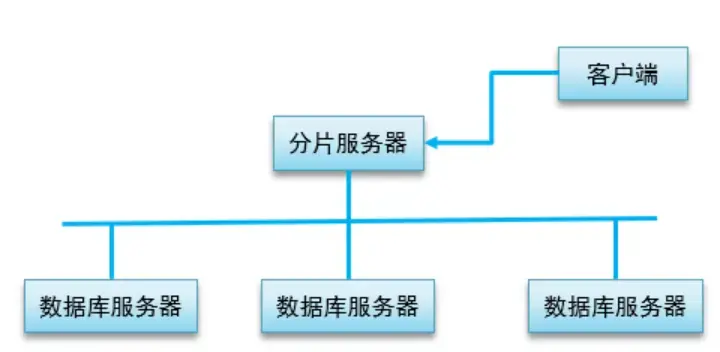
拓扑图.png
二、操作流程:
- server.xml添加要创建的新库名
- schema.xml添加要创建的表名
- 重启服务
- 客户端登录验证配置
三、实现操作:
第一步:server.xml添加要创建的新库名
- 将server.xml中的二个用户进行添加新库“GAMEDB”
[root@host60 conf]# vim /usr/local/mycat/conf/server.xml <user name="root"> <property name="password">123456</property> <property name="schemas">TESTDB,GAMEDB</property> 定义库名 </user> <user name="user"> <property name="password">user</property> <property name="schemas">TESTDB,GAMEDB</property> <property name="readOnly">true</property> </user> 第二步:schema.xml添加要创建的表名
- 添加一组schema标签,定义表名和存储算法
[root@host60 conf]# vim /usr/local/mycat/conf/schema.xml <?xml version="1.0"?> <!DOCTYPE mycat:schema SYSTEM "schema.dtd"> <mycat:schema xmlns:mycat="http://io.mycat/"> # 在此行下方添加如下行 其他行不能动 <schema name="GAMEDB" checkSQLschema="false" sqlMaxLimit="100"> 定义库名 <table name="user" dataNode="dn1,dn2,dn3" rule="mod-long" /> # type="global" 不分片存储,全部存储 <table name="salary" dataNode="dn1,dn2,dn3" type="global" /> </schema> ... </mycat:schema> 第三步:重启服务
# 重启mycat服务 [root@host60 conf]# /usr/local/mycat/bin/mycat restart # 查看端口号 [root@host56 conf]# netstat -utnlp | grep 8066 tcp6 0 0 :::8066 :::* LISTEN 3301/java 第四步:客户端登录验证配置
- 客户端登录分片服务器查看新建的库表
[root@host50 ~]# mysql -h192.168.88.60 -P8066 -uroot -p123456 mysql> show databases; +----------+ | DATABASE | +----------+ | GAMEDB | | TESTDB | +----------+ mysql> use GAMEDB; mysql> show tables; +------------------+ | Tables in GAMEDB | +------------------+ | salary | | user | +------------------+ - 存储或操作数据测试
[root@host50 ~]# mysql -h192.168.88.60 -P8066 -uroot -p123456 Mysql> use GAMEDB; # 创建user表并存储数据 mysql> create table user( id int , username char(10) , password char(6) ); mysql> insert into user(id,username,password) values(17,"a","123456"),(17,"b","654321"),(17,"c","121123"); mysql> insert into user(id,username,password) values(4,"a","123456"),(4,"b","654321"),(4,"c","121123"); mysql> insert into user(id,username,password) values(9,"a","123456"),(9,"b","654321"),(9,"c","121123"); # 在数据库服务器本机查看数据 [root@host63 ~]# mysql -uroot -p123qqq...A -e 'select * from db1.user' mysql: [Warning] Using a password on the command line interface can be insecure. +------+----------+----------+ | id | username | password | +------+----------+----------+ | 9 | a | 123456 | | 9 | b | 654321 | | 9 | c | 121123 | +------+----------+----------+ [root@host64 ~]# mysql -uroot -p123qqq...A -e 'select * from db2.user' mysql: [Warning] Using a password on the command line interface can be insecure. +------+----------+----------+ | id | username | password | +------+----------+----------+ | 4 | a | 123456 | | 4 | b | 654321 | | 4 | c | 121123 | +------+----------+----------+ [root@host65 ~]# mysql -uroot -p123qqq...A -e 'select * from db3.user' mysql: [Warning] Using a password on the command line interface can be insecure. +------+----------+----------+ | id | username | password | +------+----------+----------+ | 17 | a | 123456 | | 17 | b | 654321 | | 17 | c | 121123 | +------+----------+----------+ # 创建salary表并存储数据 mysql> create table salary( name char(10), pay int ); mysql> insert into salary (name,pay) values("a",10); mysql> insert into salary (name,pay) values("b",20); mysql> select * from salary; +------+------+ | name | pay | +------+------+ | a | 10 | | b | 20 | +------+------+ 2 rows in set (0.09 sec) # 在数据库服务器本机查看数据 [root@host63 ~]# mysql -uroot -p123qqq...A -e 'select * from db1.salary' mysql: [Warning] Using a password on the command line interface can be insecure. +------+------+ | name | pay | +------+------+ | a | 10 | | b | 20 | +------+------+ [root@host64 ~]# mysql -uroot -p123qqq...A -e 'select * from db2.salary' mysql: [Warning] Using a password on the command line interface can be insecure. +------+------+ | name | pay | +------+------+ | a | 10 | | b | 20 | +------+------+ [root@host65 ~]# mysql -uroot -p123qqq...A -e 'select * from db3.salary' mysql: [Warning] Using a password on the command line interface can be insecure. +------+------+ | name | pay | +------+------+ | a | 10 | | b | 20 | +------+------+ - 由于salary表的type=global,所以每台数据库服务器存储的数据都是一致的